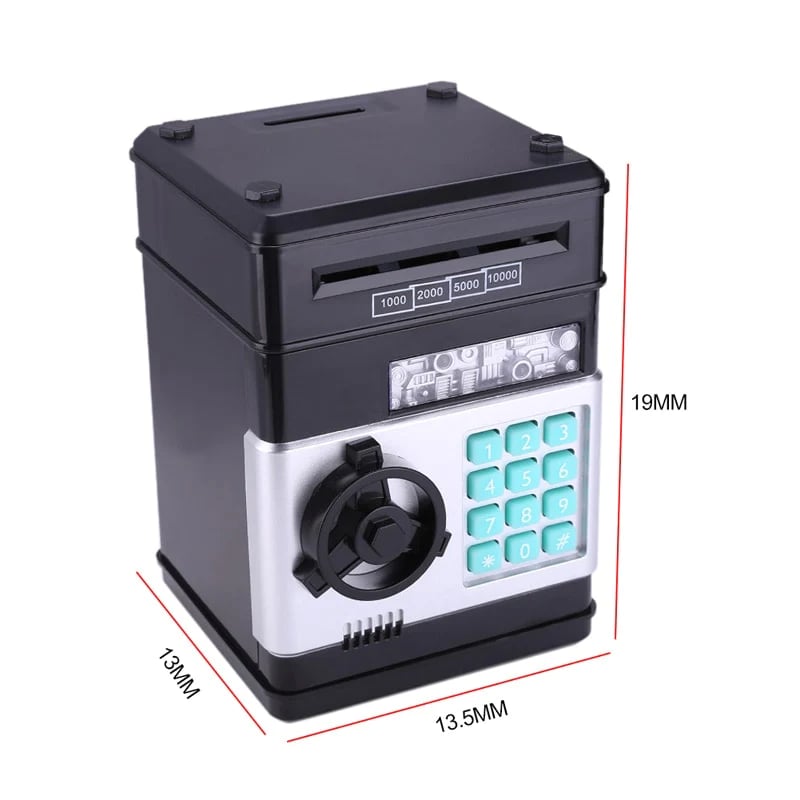
💥 Mini Electronic ATM Toy – Fun Automatic Deposit & Withdrawal Bank
💥 Mini Electronic ATM Toy – Fun Automatic Deposit & Withdrawal Bank


Couldn't load pickup availability

💥 Mini Electronic ATM Toy – Fun Automatic Deposit & Withdrawal Bank
Make Saving Money Fun & Exciting!
Turn everyday saving into an interactive adventure with this mini electronic ATM. Designed like a real ATM, it gives kids a fun way to store coins and banknotes while learning simple money-saving habits through play.


A Piggy Bank That Feels Like a Real ATM
Save. Enter a password. Deposit. Withdraw. Kids can enjoy an exciting pretend-banking experience while becoming more familiar with the idea of saving and managing their own pocket money.
Why Kids Love It
PERSONAL 4-DIGIT PASSWORD
Give kids their own private savings space with a customizable four-digit password. Enter the correct code to unlock the door, while an incorrect code triggers a reminder to try again.

ROOMY SAVINGS COMPARTMENT
The spacious interior provides plenty of room for coins and paper money, making it easy for children to build their own little savings collection and set simple saving goals.

AUTOMATIC BANKNOTE FEEDER
Place a banknote into the top slot and the built-in mechanism pulls it inside automatically. It's an engaging feature that makes every deposit feel more like using a real ATM.

STURDY ABS CONSTRUCTION
Made with durable ABS material and designed for everyday play. The simulated ATM styling gives children an engaging role-play experience while the solid construction is easy to handle.

FUN LEARNING THROUGH PLAY
More than just a money box, this mini ATM encourages children to interact with saving in a playful way. It can be used for birthdays, holidays, rewards, pretend play and everyday saving activities.

How to Use the Mini ATM
Enter the 4-Digit Password
Enter the correct four-digit password. The default password is 0000. A green light indicates that the code is accepted. If an incorrect code is entered, the red light will indicate that the password needs to be tried again.
Unlock the Door
Once the password is accepted, turn the knob clockwise to open the door. The green indicator remains active for a short period while the door is unlocked.
Deposit Coins or Banknotes
Insert coins through the coin slot. For paper money, place the banknote into the top feeder and the mechanism will pull it inside automatically.
Access Your Savings
Enter the correct password whenever you want to open the compartment and take out the saved money.
How to Change the Password
Set a new four-digit password in just a few simple steps.
Enter the current four-digit password. The default password is 0000. When the green light appears, turn the knob clockwise to open the door.

Press and hold the * button while keeping the door open. The red indicator light will begin flashing.

Enter your new four-digit password within 15 seconds, then press the # button. The indicator light will stop flashing when the new code has been registered.

Release the * button. Your new password is now set. Close the door and the ATM is ready for use.


Good to Know
- If the ATM will not be used for more than one week, remove the batteries to help prevent unnecessary battery drain.
- Keep the product away from water and excessive moisture. Adult supervision is recommended for younger children during setup and use.
- The automatic banknote feeder may have difficulty with very old, heavily creased or extremely soft paper money.
- Always make sure the door is properly closed after use. If the door remains open, the unit may produce reminder sounds.
- Check the battery compartment and product instructions before first use to ensure proper operation.

Turn Saving Into Their Favorite Game
A fun, interactive gift that makes saving money feel exciting from the very first deposit.